


Most people ask this question after their internet has annoyed them for the fifth time that week. The film buffers, the video call freezes, and the obvious next move looks like a faster plan or better wifi gear. Sometimes it is neither.
Yes, for the devices that move a lot of data. The Conduction Company runs ethernet to TVs, entertainment systems, and office computers in Auckland homes because a cable is faster and steadier than wifi. The bigger gain is indirect: taking those devices off wifi frees the wifi up for everything else in the house.
Does an ethernet cable actually make a difference?
It does, and for two reasons rather than one.
The first is the obvious one. A cable carries a lot of data and it is extremely stable, so you get a consistent download and upload speed every time. No drop-outs when someone shuts a door, no slow patch at the far end of the house.
The devices that benefit most are the ones with the most to move:
- TVs and entertainment systems. Anything streaming. Plugged into the network directly, it stops the buffering that shows up halfway through a film. Watching in 4K over a weak wifi signal is where this bites hardest
- Computers and office workstations. Especially for video calls, where you do not want lag, and for uploading or downloading large files, where you want the speed to hold
Everything else, the phones, tablets, and laptops that move around the house, is fine on wifi. That is what wifi is for.
The argument nobody else makes: a cable makes your wifi better
This is the part clients rarely expect, and it is the real reason The Conduction Company recommends cabling.
If every device in the house runs on wifi, every device competes for the same air. Put fifty devices on one wifi network and they are all fighting each other, so each one ends up with a lower transmission rate than it could have had. The network is not broken. It is crowded.
Move the heavy devices onto their own cables and they stop competing. The phones and tablets that can only connect over wifi now have the airspace to themselves. Every device in the house gets better speed, including the ones you never touched.
"It's just the proper way to do it."
Jordan Statham, Director of The Conduction Company, Registered Electrician and Registered Electrical Inspector.
A real Auckland job: a mesh system, a fibre upgrade, and six cables
A technical client rang The Conduction Company with a house full of high-demand devices and nothing running fast enough. He had already worked out what he thought was wrong, and he had already paid to fix it twice.
He decided it was a signal strength problem, because everything in the house connected over wifi. So he had a wireless mesh system installed, which gave him a strong signal in every room. When that did not fix it, he upgraded his connection to Hyperfibre at the ONT.
It still did not fix it.
Signal strength was never the problem. He had too many devices sharing one wifi network, all competing for the same bandwidth, and wifi is slow compared with a wire. A stronger signal and a faster plan do not help when the bottleneck is the competition itself.
The Conduction Company took his highest-demand devices and connected them by cable to a network switch wired back to the router. That traffic got a stable path of its own, and it handed the wifi back to everything else.
About six ethernet cables, and the whole house got much faster. Two expensive fixes had not touched the actual fault.
So when is a mesh system the right answer?
Often, and it is worth being fair about this. That client did not buy a bad product. He bought the right fix for a different problem.
Mesh solves coverage. Weak signal, dead spots, one room where nothing works. If that is your complaint, mesh is the answer, and The Conduction Company installs mesh systems across Auckland homes and offices.
There is a very common Auckland cause behind those dead spots, and it starts outside the house. The ONT, the box where the fibre arrives, usually goes on a perimeter wall, often in a corner. The router then ends up beside it. In most homes the router is the main source of wifi, so the signal is now coming from one corner of the building. Near it, strong. Far corner of the house, weak.
What The Conduction Company does about it is turn the router's own wifi off and put mesh nodes evenly through the home. You log in exactly as before, same network name and same password. Wherever you stand, your phone picks the nearest node and connects at the best rate available.
Mesh nodes and access points are not the same thing
They look similar and they get muddled constantly. An access point can act as a node on a mesh system, but it also does something a mesh node does not.
Say you have a sleepout or granny flat you rent out. An access point in that building gives the occupant their own network, nested under the main one. One internet connection, separate networks, one per zone. The tenant logs into their own portal instead of sharing the household network.
What The Conduction Company recommends, matched to the problem you actually have.
One room has weak signal or drops out. Mesh. It is a coverage problem.
Everything is slow everywhere, and there are a lot of devices. Cable the heavy devices. It is a competition problem.
The film buffers on the big TV. One cable to the TV.
A sleepout or flat needs its own network. An access point in that building.
You are building or renovating right now. Cable everything while the walls are open.
What cable do you actually need?
Cat 6, and in a home there is rarely a reason to go above it. It carries gigabit speeds, which is more than enough for several devices streaming heavily off one cable. Where The Conduction Company runs one cable per device, Cat 6 covers standard home equipment comfortably.
Cat 6A gets recommended all over the internet as future proofing. The Conduction Company's honest position is that in a normal home it is a waste of money. It handles ten gigabits per second, it costs substantially more per metre, and clients who have insisted on it, against The Conduction Company's advice, were not running anything that needed it.
If you genuinely do move very large amounts of data, the answer is not thicker copper. It is fibre optic, which is faster than Cat 6A and carries more. The Conduction Company has installed a number of fibre runs for clients who need that. The clearest example is video editing off a server, where the raw footage sits on storage and the editor is scrubbing through it remotely. Fibre suits that far better than Cat 6A.
What does it cost to run ethernet through a house?
We quote on facts, not guesses
Before we give you a price, we carry out a proper assessment of your property and how you'll use the cabling. That way you know exactly what you're buying and the total cost, with no surprises. Clear expectations from the outset, start to finish.
There is a straight answer here and it is not the one most pages give. The Conduction Company does not publish a per-point price for data cabling in an existing home, because there is no honest one to publish.
The cable is cheap. It is eight fine copper cores in a sheath, and there is very little copper in it, so the cost per metre is low. Electrical cable is expensive because of its copper content. Data cable is not.
What you are paying for is getting the cable there, and that is decided by how your house is built.
Here is what that looks like in practice. These are three real jobs, all of them a single cable run, taken from The Conduction Company's own completed Auckland work. The only thing that changed was how the cable got to where it was going.
The estimates below are for standard data cabling work. The Conduction Company confirms final pricing after a property assessment.
Three cable runs The Conduction Company has completed, and what each cost.
One cable, prep room through to the patch panel. Underfloor space, straight run. About $290 including GST.
One cable, from the ONT up to a bedroom. Up to a first floor, dropped inside the wall. About $600 including GST.
One cable, run under a deck. Outside, gel-filled cable in conduit. About $950 including GST.
Same job on paper. Three times the price, decided entirely by access. That is why The Conduction Company will not put a per-point rate on this page. It would be wrong for most of the homes reading it, and you would find out on the day.
What the access in your home means for the work The Conduction Company has to do, and for the price.
Underfloor space available. Cable runs low level, back to the router, jack each end. Cheapest by a clear margin.
No underfloor, ceiling space usable. Drill down inside the walls, run through the ceiling space. Higher, more labour.
No underfloor and no ceiling space, or multi-level. Surface-mounted mini trunking inside, conduit outside, or opening walls up and patching after. Highest, and it can run into the thousands for a whole home.
The one cost rule worth knowing
The first cable carries almost all the labour. Getting into the floor or the ceiling, drilling the holes, running the route: that work happens once. Every extra cable pulled at the same time adds materials, a jack, and a few minutes to terminate it.
So if you are running a cable to a spot, run spares to it at the same time. The Conduction Company puts two, three, or four jacks at a position as standard, because going back later means paying the hard part of the labour twice. That is the single most useful thing on this page.
There are two situations where The Conduction Company can give you a number in advance: a new build, where the walls are open, and a fault visit where something has simply stopped working. Both are covered in what a data cable costs to install in Auckland, along with what each access type means for your bill. For anything else, The Conduction Company looks at the property and prices the job.
What is the best way to run ethernet cable through a house?
Where there is an underfloor space, The Conduction Company runs it from below: a small hole in the wall where each jack goes, then down into the underfloor. Where there is none, the cable is usually dropped down inside the wall from the ceiling space. Clients often picture holes through every wall and a fortnight of plastering instead.
It depends on how the house is built, and in The Conduction Company's hands it is very little mess, especially where there is an underfloor space.
Small holes get cut in the wall exactly where the data jacks are going. The team drills down through those holes into the underfloor space. Drop sheets go down first, and the small amount of dust gets vacuumed up straight away. Even where a run has to go through the ceiling, the cable can usually be dropped down inside the wall, especially on an internal partition wall. There are no large holes left behind to patch and plaster.
What clients ask The Conduction Company before a cabling job starts.
Will my house be a mess? Very little, and The Conduction Company cleans up before leaving.
Do we need to move out? No. The family stays in the house.
Will the power be off? No. Data cabling is extra-low voltage, so the power stays on all day.
Will it be noisy? A little, while drilling. The Conduction Company tells you beforehand.
How long does it take? A typical four or five point job runs four to eight hours, so half a day to a full day.
Can you run your own data cable?
Legally, yes. Data cabling runs at extra-low voltage. Schedule 1, clause 2(b) of the Electricity (Safety) Regulations 2010 says work on fittings that "are intended solely for connection to, or are associated solely with, electricity supplies not exceeding extra-low voltage", and are not in a hazardous area, is not prescribed electrical work. No licence, no certificate, and no electrician you are obliged to call. The Conduction Company will not pretend otherwise.
If you are moderately handy and you understand houses, it is not a particularly hard task. The Conduction Company does get called back to DIY cabling fairly often though, and the faults are consistent:
- Connections and terminations. Easily the most common
- Cheap parts. Low-quality jacks and cable
- Not quite right. The cable works, but the speed drops a long way, which is why people rarely suspect the cabling
The fix is usually small. A re-termination, or a better part.
The real caution is not the wire, it is the hole. Drilling through walls and making penetrations through the building envelope is worth handing to someone with experience. Get it wrong and you are looking at structural damage or water getting into the building, and either one costs far more than the cabling ever saved.
The other thing worth paying for is the thinking. Where the cables should go, how the network is laid out, and which equipment to buy is where most of the value sits, and it is exactly what the client in the story above got wrong twice before ringing. The Conduction Company handles data cabling and WiFi installation across Auckland from the design of the layout through to the jack in the wall.
Building or renovating? This is the cheap moment
If your walls are open, do it now. Everything above about access, labour, and mess stops applying.
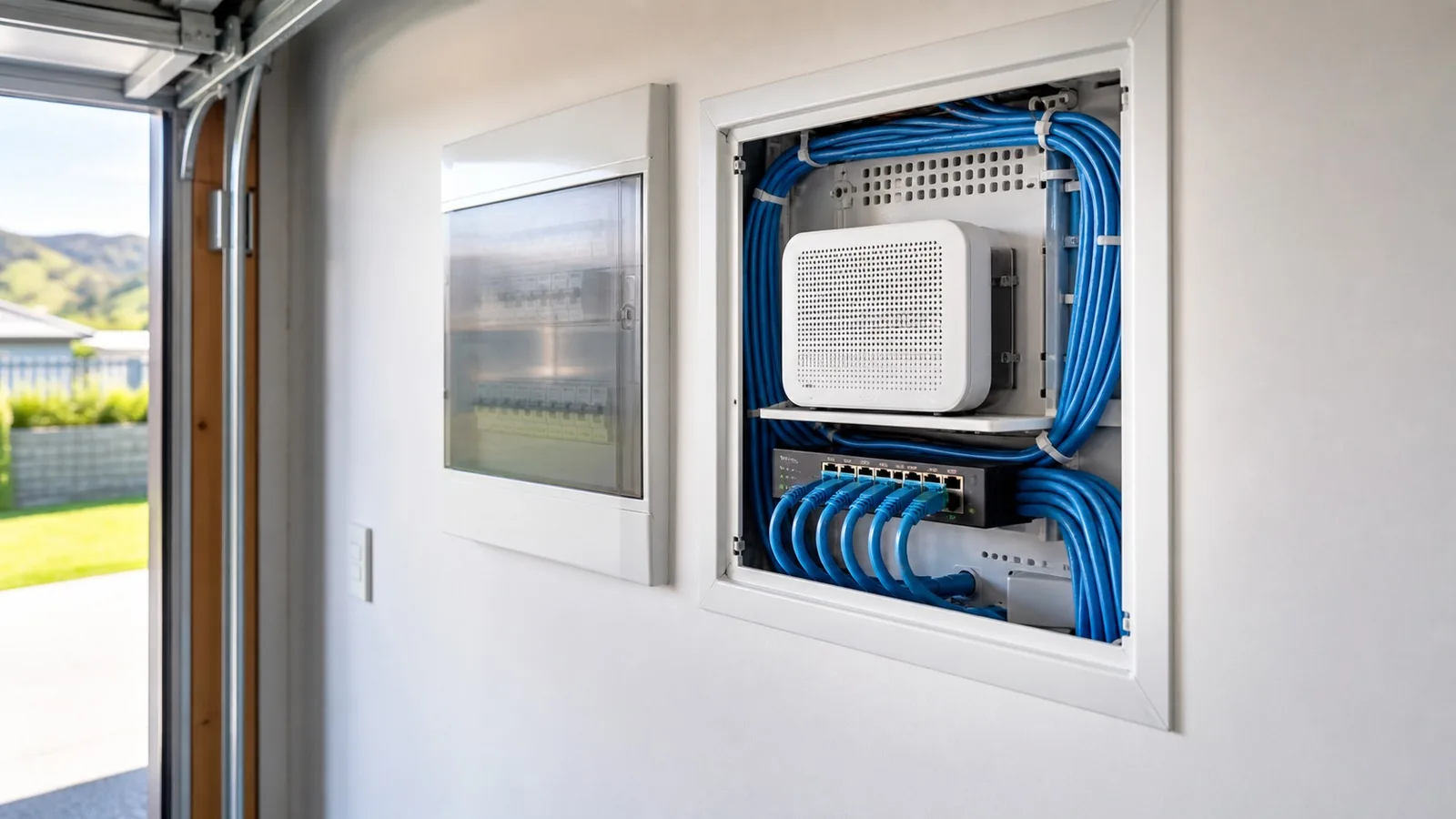
A new build gets a recessed data panel in the garage, sitting near the combined switchboard and meter board. From outside it often looks like the switchboard. The fibre conduit comes from the street, under the house, and straight up into it, so nothing has to be run around the outside of the building. The router or network switch lives inside that panel, and the cabling fans out to the wall jacks. With the plasterboard off, every hole gets drilled in one pass.
Where The Conduction Company puts the cables, unless a client wants otherwise:
- The main entertainment unit
- One to each TV point
- One to any office
- One to each bedroom, because a study desk usually turns up eventually
The Conduction Company also still runs aerial cable alongside the data cable on most new builds, so each room gets a data jack and an aerial jack on one plate, low down where a desk is likely to go. If you want the detail on that side, The Conduction Company covers TV aerial and AV installation across Auckland as well, and the two jobs are done on the same visit.
Cabling a house while it is open costs a fraction of coming back afterwards. It is the one decision on this page that gets more expensive every year you leave it.
Frequently asked questions
Is it worth running ethernet cable through an older Auckland home?
Usually yes, and older homes are often easier than people expect. Where there is an underfloor space, The Conduction Company can run cable end to end with very little disruption. It is homes with no underfloor and no usable ceiling space that get expensive.
Do I need Cat 6 or Cat 6A?
Cat 6 for a home. It carries gigabit speeds, which covers everything a normal household runs. Cat 6A costs substantially more per metre and The Conduction Company's position is that in a home without high-throughput equipment it is a waste of money. If you genuinely need more, the answer is fibre optic, not Cat 6A.
Can I run my own data cable in New Zealand?
Yes. Data cabling is extra-low voltage, so under Schedule 1, clause 2(b) of the Electricity (Safety) Regulations 2010 it is not prescribed electrical work and needs no licence. The Conduction Company would still think hard before drilling through the building envelope yourself, because a leak or a weakened structure costs far more than the cabling saves.
Will running ethernet mean holes all through my walls?
No. Small holes get cut where the jacks are going and the cable is dropped down inside the wall from there. Drop sheets go down, dust is vacuumed up, and there are no large holes left to patch. The Conduction Company keeps the power on throughout, because data cabling is extra-low voltage.
Is mesh wifi better than running cables?
They fix different problems. Mesh fixes weak signal and dead spots. Cabling fixes everything being slow because too many devices are sharing the wifi. The Conduction Company installs both, and which one you need depends on whether your complaint is coverage or speed.
How much does it cost to run ethernet cable through a house?
It depends almost entirely on access, so The Conduction Company prices it after looking at the property rather than publishing a per-point rate. On a new build, where the walls are open, it is about $100 to $150 per cable run including GST. A fault or diagnostic visit is about $180 to $270 including GST. These are estimates, not quotes.

